Spin - Electric Scooters
- 4.7
- Rating
- 1.00M
- Installs
- Free
- Price

 Analysis by App-foxy
I first approached Spin - Electric Scooters as a practical way to cover short urban trips, not as a replacement for every kind of transport. That distinction matters. Spin is a free Travel & Local app from Pheenix USH LLC that connects the phone experience with shared electric scooters, so its value depends heavily on where you live, where you are going, and whether a scooter is actually available when you need one.
After using it as part of an ordinary city routine, I found the basic idea easy to understand: open the app, look for a nearby scooter, check the route, unlock a vehicle, ride responsibly, and finish the trip in a permitted place. The app is aimed at an Everyone audience, and the current version is 4.399.0.8. It has been available since May 28, 2017, which gives it a more established feel than a brand-new mobility experiment.
My overall impression is positive, but not blindly enthusiastic. Spin works best when you treat it as a flexible first-mile and last-mile tool, rather than assuming it will always be faster or cheaper than walking, cycling, public transport, or a conventional taxi. The strongest experience comes from building a repeatable habit around it: check availability before leaving, choose a realistic destination, inspect the ride details, and allow a little time for the final parking step.
You May Also Like

 Blood Strike: 2.5 Anniversary
Blood Strike’s Loadouts Turn Every Drop Into a Tactical Gamble
A close look at Blood Strike’s custom loadouts: how fast access to signature weapons reshapes its battle royale rhythm, rewards preparation, and narrows the gap between fights.

 Pandora - Music & Podcasts
Pandora’s Music Is Easy to Start, but Harder to Recover
Pandora’s strength is its low-effort path from a seed to a station. Its weak spot is how much confidence it asks you to place in connection, setup, and quiet recovery.

 8 Ball Pool
 Is Built on Rivalries, Rematches, and Routine
A close look at the rivalries, rematches, shared routines, and unanswered safety questions that turn a quick pool match into a persistent mobile community.

 Samsung Music
’s Quiet Strength Is Playing What You Already Own
Its reach comes less from spectacle than from dependable access to a personal library. That simplicity is both the app’s strongest retention engine and its ceiling.

 AccuWeather: Weather Radar
AccuWeather Review: A Quick, Clear Forecast for Everyday Decisions
For everyday plans, the best forecast is the one you can understand quickly. AccuWeather makes rain timing, radar, and local conditions easy to act on, with a few trade-offs.

 Hill Climb Racing
Why Hill Climb Racing Still Turns Crashes Into One More Run
A tiny car, a bumpy hill and one more upgrade: Hill Climb Racing keeps resurfacing because its simple chaos makes every near-miss feel personal.
More From Our News Desk



How I use Spin for a normal short trip
My baseline workflow starts before I am standing on a street corner. If I know I have a meeting, a train to catch, or an appointment across a large neighborhood, I open the app early enough to see whether a scooter is available near my starting point. This simple check prevents one of the most common frustrations with shared mobility: planning around a vehicle that disappears before you reach it.
I then compare the scooter location with the first part of my route. The closest marker is not automatically the best choice. A scooter on the opposite side of a busy road, behind a building, or at the edge of a restricted area may take longer to reach than one a little farther away. I have found that looking at the map as a walking problem, rather than only as a distance problem, makes the decision more reliable.
Before unlocking, I use the available ride information to confirm that the vehicle is still present and appears usable. A quick visual inspection is worthwhile once I reach it. I check the general condition, the controls, the wheels, and whether anything looks obviously damaged. This is not an exciting part of the process, but it is one of the habits that separates a smooth ride from an avoidable interruption.
The actual ride feels most natural for short urban connections. I would use Spin to close a gap between a transit stop and an office, cross a district that is inconvenient on foot, or reach a nearby shop without taking a car. I would not choose it for carrying bulky shopping, transporting another person, or traveling somewhere that requires a long uninterrupted journey. The scooter format is convenient precisely because it is light and quick to pick up; those same qualities limit what it can replace.
Ending the ride deserves as much attention as starting it. I look for a sensible parking location before I begin the final block. That avoids circling around the destination while trying to find a place that does not obstruct pedestrians or entrances. I also take a moment to make sure the app recognizes the end of the trip correctly. A rushed finish can turn an otherwise simple ride into a support issue, so I prefer to complete that step while I am still paying attention.
A realistic weekday example
Imagine I am commuting by train and need to reach a workplace several blocks beyond the station. Walking may be manageable, but it could make the final part of the journey longer than necessary. I check Spin while leaving the platform, select a nearby scooter, and walk directly toward it instead of wandering around the station area. Once I arrive, I inspect it, start the ride, and follow the streets that make sense for a scooter rather than blindly copying a car route.
At the destination, I stop short of the building entrance and use the last minute to identify a considerate parking position. The important efficiency gain is not only the ride itself. It comes from combining the app with a predictable walking route, a planned destination, and a deliberate end-of-ride routine. Without those habits, the time saved on the scooter can disappear while searching for a vehicle or a legal place to leave it.
This workflow also answers a question many new users have: do you need to be an experienced rider to use the app? No, but you do need to be comfortable making small decisions in a changing street environment. The application can help locate and start a ride, yet it cannot remove the need to watch traffic, pedestrians, road surfaces, and local restrictions.
Settings and checks that are worth your attention
Spin is not an app I would install and immediately ignore. I recommend spending a few minutes looking through the account and ride-related options before depending on it for an important trip. The useful goal is not to change every setting. It is to make sure the app behaves in a way that matches how you travel and that you understand the screens you will use under time pressure.
Start with account and payment details, then confirm that the information required to begin a ride is ready. A shared scooter is most useful when the setup has already been handled. Discovering a missing account step beside a station or outside a venue is exactly the kind of delay that makes people decide the service is unreliable, even when the real problem is an unfinished setup.
I also pay attention to map presentation and location access. If the map does not show my position clearly, I avoid assuming that the nearest scooter marker is beside me. I move to an open area, refresh my view, and compare the map with visible landmarks. This is especially helpful around large campuses, shopping centers, transit hubs, and multi-level streets where a map pin can be technically close but practically awkward.
Notifications can be useful when they relate directly to a ride, but I prefer to keep my phone experience focused. An app like this has a clear job: help me find, start, and finish a scooter trip. I do not want unrelated interruptions competing with navigation or safety decisions. The exact options available can vary by device and app release, so I check what is actually shown on my phone rather than assuming every user sees identical controls.
Another worthwhile check is the local riding and parking information presented in the app. Shared mobility rules are not uniform from one area to another, and the practical boundaries can matter more than the distance on the map. I look for indications of places where a ride may not begin, continue, or end. If my destination sits near a boundary, I plan an alternative walking finish instead of discovering the restriction after the trip has started.
One of my more useful habits is to treat the app’s map as a planning aid, not as a guarantee. A marker tells me where the service expects a scooter to be, but the street still determines whether I can reach it easily. I check the surrounding sidewalks, crossings, and access points. This small adjustment reduces wasted walking and is more valuable than repeatedly reopening the map without changing the plan.
Small preparations that prevent larger problems
I keep the phone charged when I know I will rely on Spin for the return journey. That sounds obvious, but the app is part of the ride process, not merely a directory. If the phone becomes unusable at the wrong moment, locating, managing, or ending the trip becomes much harder.
I also avoid beginning a ride while carrying more than I can safely manage. A backpack is one thing; loose bags, fragile parcels, or heavy shopping can make a scooter a poor choice. This is a good example of a limitation that does not appear in a short store summary: the convenience of a shared scooter depends on what my body and hands can comfortably handle while riding.
Finally, I check the weather and the street conditions before committing. Even when the app is working perfectly, rain, poor visibility, uneven surfaces, or heavy pedestrian traffic can change the decision. On those days, walking or public transport may be slower in theory but more sensible in practice.
Faster patterns for repeat users
Once I had used Spin several times, I stopped treating every trip as a new search. The fastest pattern is to create a mental shortlist of reliable pickup areas and destination zones. I still verify live availability, but I already know which streets are easy to reach and which locations tend to create a difficult final parking decision.
For a regular commute, I use a two-stage plan. First, I identify the nearest practical pickup point. Second, I choose a drop-off area that leaves a short, straightforward walk to the destination. This is often better than trying to finish directly at the entrance. A slightly less exact drop-off can be faster overall if it avoids crowded sidewalks, restricted spaces, or a confusing building frontage.
I also build a backup into important journeys. If I need to arrive on time, I check Spin before leaving and decide what I will do if the nearest scooter is gone. The backup might be walking to another pickup area or continuing by transit. This does not reduce the value of the app; it makes the app fit real city conditions instead of forcing the entire trip to depend on one vehicle.
Another efficient habit is to separate discovery from movement. I search for a scooter while stationary, decide which one I want, and then walk toward it. I do not try to navigate the map continuously while crossing streets or riding. This keeps the phone task contained and leaves more attention for the environment around me.
For visitors, I recommend using Spin for a single, well-defined connection before attempting a full day of spontaneous rides. A short trip from a transit stop to a nearby attraction is a good introduction because it teaches the map, unlock, riding, and parking flow without making the entire itinerary dependent on the service. If that first experience is smooth, the visitor can decide whether it fits the rest of the day.
For residents, the best use case is often not the obvious one. I find it particularly useful when a destination is too far for a comfortable walk but too close to justify waiting for a car. It can also help when public transport handles most of a journey but leaves an inconvenient final stretch. In those situations, the scooter is not competing with every transport option; it fills a specific gap between them.
Where the usual alternatives win
Walking remains the better choice for very short distances, especially when finding and parking a scooter would take almost as long as moving on foot. A bicycle can be preferable for longer rides or for people who want a more stable, familiar riding position. Public transport wins when the route is lengthy, weather is poor, or I need to travel without concentrating on the road.
A taxi or rideshare is more suitable when I have luggage, another passenger, mobility needs that make a scooter unsuitable, or a destination that is difficult to reach safely on two wheels. Spin is not a universal replacement for those services. Its advantage is the combination of quick access, small vehicle size, and independence from a fixed timetable when a scooter is available nearby.
The app’s scale suggests that it is not a niche experiment. Spin has passed one million installs, carries a 4.7 average from around fifty thousand ratings, and has about fifteen thousand written reviews. Those figures make me more comfortable treating it as a serious option, but they do not guarantee that the experience in my particular neighborhood will match someone else’s. Shared mobility is local by nature: vehicle supply, street design, and parking expectations shape the result.
Advanced limits and situations where I would skip it
The biggest limitation is availability. A map full of scooters at one time does not mean the same area will be equally served when I need to return. For a flexible outing, that uncertainty is acceptable. For a flight, exam, interview, or medical appointment, I prefer a transport plan with more predictable capacity and a backup that does not depend on finding an available vehicle.
Battery and vehicle condition are practical concerns as well. I do not assume that the first scooter I see is automatically the right one. I inspect it and consider whether it looks suitable for the distance I plan to cover. If anything seems wrong, I would rather choose another vehicle or another mode than begin a trip hoping the issue will not matter.
Map boundaries can also create friction. A route that looks direct may become inconvenient if the destination is near an area where riding or parking is restricted. I plan the final walking section early, especially around campuses, dense commercial streets, and major public spaces. This is one of the most important advanced lessons: the last few minutes of a scooter trip can determine whether the whole journey feels efficient.
Safety is another reason to skip a ride. I do not use a scooter when I am distracted, carrying awkward items, feeling unwell, or facing conditions that make visibility and control poor. The app can make access convenient, but convenience should never be confused with suitability. If I cannot give the street my full attention, I choose another option.
Privacy and phone dependence are worth considering too. Like any location-based mobility service, Spin is most useful when the phone can support map and account functions. People who prefer not to use a smartphone for transport, or who regularly travel with limited battery or connectivity, may find a physical transit pass or a conventional taxi easier to manage.
There is also a learning curve around ending rides correctly. New users often focus on unlocking and forget that parking is part of the service experience. I recommend taking a screenshot or otherwise keeping a clear record of the completed ride only when that is practical and appropriate, especially during the first few uses. More importantly, I check the app’s final state before putting the phone away.
The age rating of Everyone makes Spin broadly approachable, but that should not be read as a promise that every person or every trip is suitable. The rating describes the app’s audience, while the real-world ride still depends on local rules, personal ability, traffic, and the rider’s judgment. I would explain that difference to a younger or inexperienced user before handing over responsibility for a trip.
My mastery verdict after building a repeatable routine
Spin becomes much better once I stop using it impulsively. The beginner experience is simple enough: find a scooter and ride. The experienced experience is more deliberate: check the pickup route, inspect the vehicle, understand the destination area, keep a backup, and finish in a considerate location. Those habits reduce the small delays that can otherwise make shared scooters feel unpredictable.
I would recommend it to urban residents, commuters, students, and visitors who need short independent trips and are comfortable making their own safety decisions. It is especially appealing when a transit connection leaves a gap that is too long to walk but too short to justify a car. The free app is easy to try, and the broad Everyone rating makes the software approachable for a general audience.
I would be more cautious about recommending it to someone who needs guaranteed door-to-door transport, regularly carries heavy items, dislikes riding in traffic, or lives in an area with limited scooter availability. In those cases, public transport, walking, cycling, a taxi, or a rideshare may be a better primary option. Spin can still be useful occasionally, but it should not be forced into a role it was not designed to fill.
What I like most is the way the service rewards preparation without demanding complicated technical knowledge. A few repeatable decisions—checking before leaving, choosing practical pickup points, planning the final walk, and verifying the ride’s end—make a noticeable difference. What I like least is that the app cannot control the realities around it: a missing scooter, a crowded street, a poor surface, or an awkward parking area can quickly outweigh the convenience.
My final view is that Spin is a capable short-distance mobility companion rather than a complete transport system. Pheenix USH LLC has built an app with a clear everyday purpose, and its strong user response—an average of 4.7 across around fifty thousand ratings—supports the idea that it works well for many riders. I would install it when I wanted another option for local travel, but I would keep walking, transit, and a backup plan in the same mental toolbox.
If your trips match the scooter’s strengths, Spin is worth trying as a practical link between the places your usual transport does not connect neatly. My advice is to begin with a short route, learn how pickup and parking feel in your area, and then develop the habits that make the service genuinely fast. Used that way, Spin - Electric Scooters feels less like a novelty and more like a useful part of an urban travel routine.
FAQs for Spin - Electric Scooters
01How do I find a Spin scooter near me?
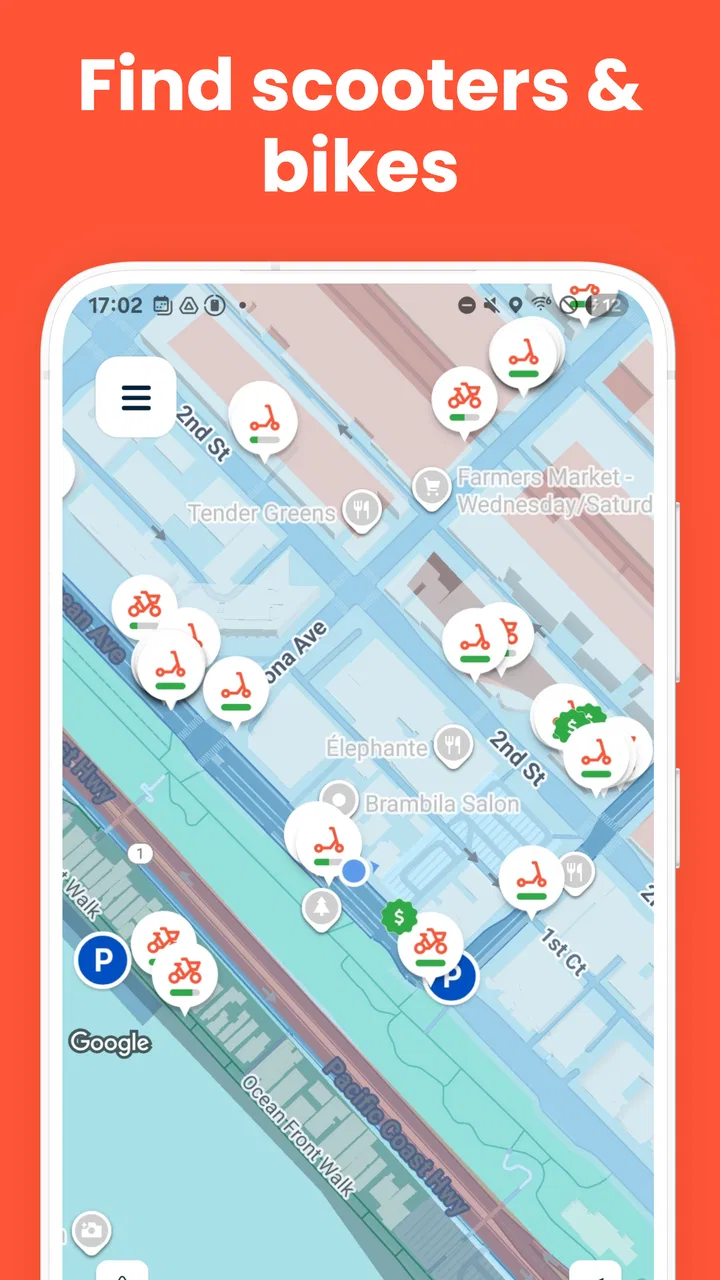
To locate a Spin scooter, simply open the Spin app and allow it to access your location. The app will display a map highlighting nearby available scooters. You can tap on any scooter icon to view its battery level and distance from your current location. Once you find a suitable scooter, you can reserve it through the app.
02What are the costs associated with using Spin scooters?
Spin charges an initial unlocking fee, typically around $1, followed by a per-minute rate that varies by city. Before starting your ride, you can view the exact pricing details within the app. Additionally, keep an eye out for any promotional offers that may provide discounts or free rides.
03Is there a minimum age requirement to use Spin scooters?
Yes, users must be at least 18 years old to ride Spin scooters. During the sign-up process, you will be required to verify your age and provide a valid driver's license. This ensures that all users are legally eligible and understand the responsibilities associated with operating an electric scooter.
04Are helmets mandatory when riding Spin scooters?
While helmet laws vary by location, Spin strongly encourages all riders to wear helmets for safety. In some cities, local regulations may require helmet use, and failure to comply could result in fines. Spin often provides helmet-discount programs, making it easier for riders to purchase one if needed.
05What should I do if I encounter a problem during my ride?
If you experience issues with a Spin scooter, such as mechanical problems or a low battery, contact Spin's customer support through the app. They can assist with troubleshooting or advise on ending your ride safely. Reporting issues promptly helps Spin maintain the quality and safety of its fleet.
Pros
- Convenient for short city commutes.
- Eco-friendly transportation option.
- User-friendly interface for rentals.
- Wide availability in urban areas.
- Cost-effective compared to taxis.
Cons
- Limited availability in smaller towns.
- Requires a stable internet connection.
- Battery life can vary by scooter.
- Not suitable for long distance travel.
- Helmet usage not enforced.

Spin - Electric Scooters
Gallery